What Is On-Device Call Screening? How Android Apps Block Calls Before They Ring
On-device call screening is a call blocking architecture where all analysis of incoming calls happens directly on the user's phone. The decision to block or allow a call is made by software running locally on the device.
Quick Answer
On-device call screening processes incoming call metadata directly on your smartphone using Android's native ROLE_CALL_SCREENING API without uploading your contacts or audio to external cloud servers.
Cloud-Based vs. On-Device: The Core Architectural Difference
Every spam call blocker on Android must make one fundamental architectural decision: where does the analysis happen?
The Privacy Implication
Cloud-based call analysis creates a data record on a third-party server every time your phone receives a call. Over months of use, this generates a detailed log: who called you, when, how frequently, from what area codes. Even if the app's privacy policy says this data is not sold, the data exists. It can be subpoenaed, breached, or subject to policy changes after an acquisition.
On-device call screening produces no such record. While cloud directory apps upload address books to build reverse-lookup databases, on-device screening avoids this trade-off entirely. The analysis happens in memory on the phone. The blocking decision is made and discarded.
For a framework to evaluate any call blocking app's privacy posture before installing, see our guide to choosing a private call blocker.
How On-Device Call Screening Actually Works on Android
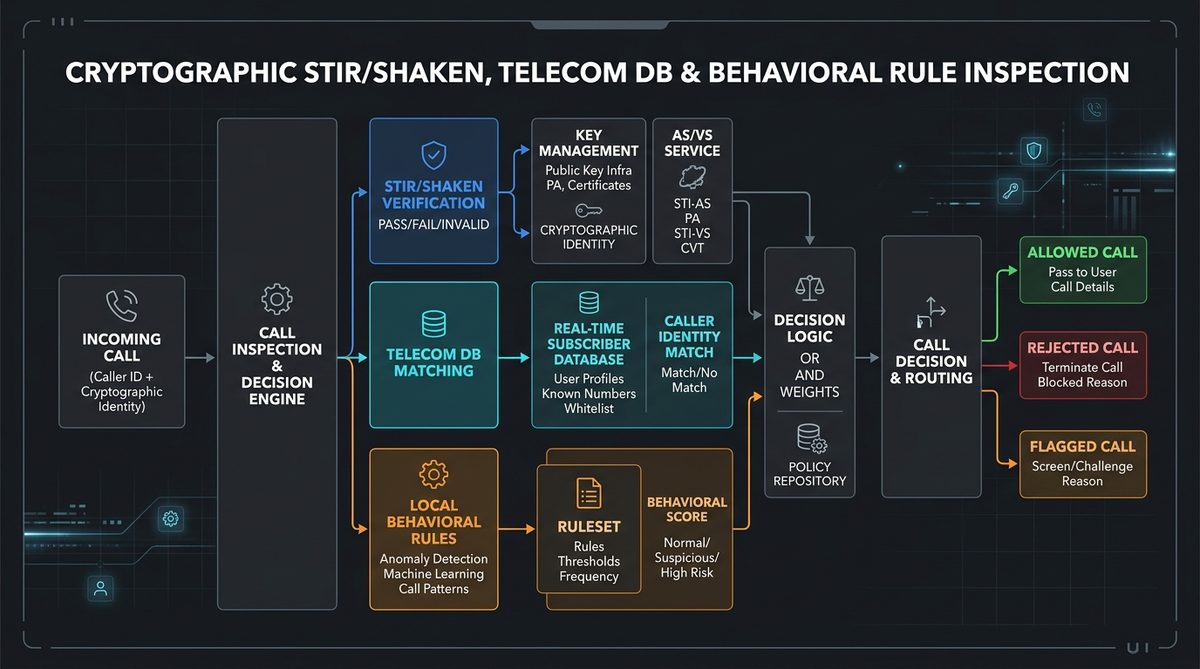
Android provides a dedicated API for this architecture: the ROLE_CALL_SCREENING system role and the CallScreeningService API class. When an app holds this role, Android invokes its CallScreeningService on every incoming call before the ringer fires, passing the caller's number and STIR/SHAKEN verification status (Passed, Failed, or Unverified). Android's call screening API does not expose the A, B, or C level; it reports only whether the network verified the number.
The app's screening logic runs on-device and returns a CallResponse — allow, reject, or silence — within the API's deadline. Android enforces the decision. When Callro blocks or silences a call, your phone does not ring. See What Is ROLE_CALL_SCREENING? for the full technical walkthrough.
How Callro Implements On-Device Call Screening
Callro holds the ROLE_CALL_SCREENING role and processes incoming calls through the Gauntlet Engine. Callro reads the carrier's STIR/SHAKEN verification status (Passed, Failed, or Unverified) as reported by Android.
Callro downloads spam-number lists to your phone in the background. Callro does not request access to your contacts, your phone's call log, or your microphone.
Frequently Asked Questions
What is on-device call screening?
On-device call screening lets an app decide how to handle an incoming call right on your phone.
Do on-device call screeners need to upload contacts?
No. On-device call screening does not require contacts access. The screening decision is based on the incoming caller's number and carrier-provided signals, not on the device's address book. Apps that request contacts access are doing so to build allowlists or for their own data purposes unrelated to the core call screening function.
Key Takeaways
- On-device screening executes call analysis natively without uploading address books to third-party clouds.
- Operating via Android's ROLE_CALL_SCREENING API lets Callro block or silence a call before your phone rings.
- Local behavioral heuristics drop unauthenticated autodialers without sharing contact metadata.
Callro stops flagged calls from ringing your phone.
Callro processes incoming call screening decisions locally on your Android handset before the phone rings. Try it free for 7 days.
Get Callro Free →