Why RoboKiller Users Cancel & Best Alternatives
Quick Answer
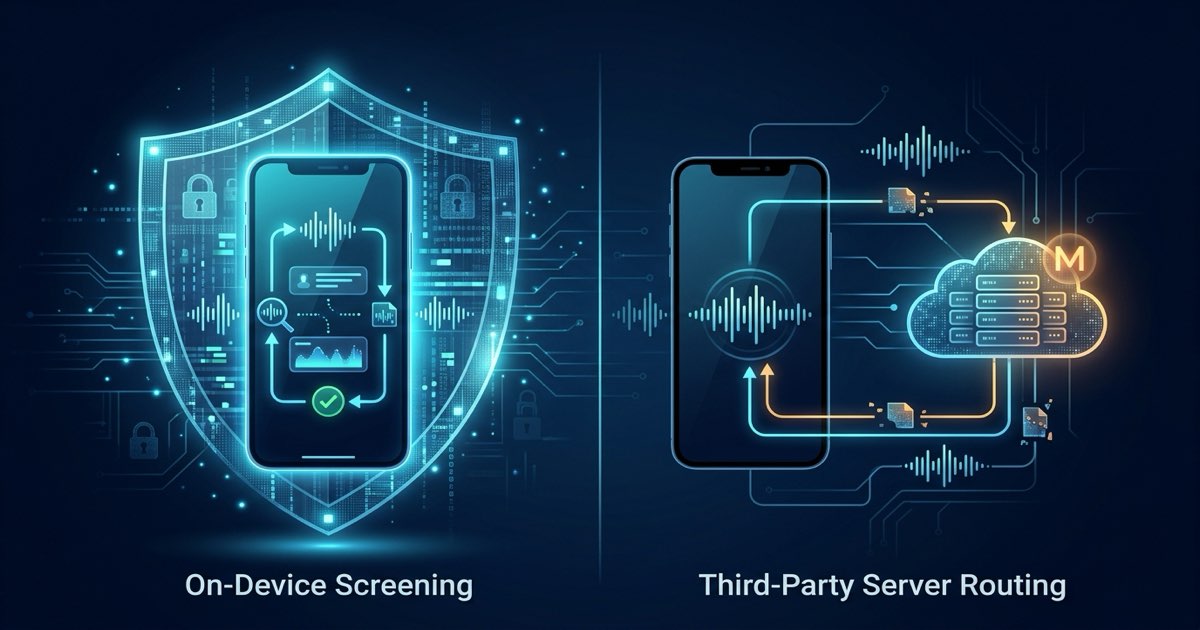
Users often cancel RoboKiller due to recurring subscription costs and upfront annual billing, call forwarding setup complexity, and privacy concerns over audio recording and contact syncing. The best alternatives prioritize on-device call screening that blocks robocalls without routing calls through third-party servers.
Robokiller was among the most-recommended spam call blockers on Android and iOS for years (see our Callro vs RoboKiller comparison). Recently, something changed. App Store and Play Store reviews show a consistent pattern: users are cancelling, citing recurring billing surprises, carrier forwarding failures, and declining spam detection. If looking for a Robokiller alternative, here's what actually changed. Review our guide to stopping spam calls on Android to compare solutions.
What Changed with RoboKiller?
The Price Transparency Problem
The most common complaint in recent Robokiller reviews across both the Play Store and App Store centers on billing surprise. Users report being shown a low weekly or monthly rate during signup — then charged a higher annual fee upfront without clear disclosure at the point of purchase. Multiple recent reviews describe discovering the annual charge only when it appeared on a credit card statement, with the app offering limited recourse for refunds.
This is not a new dynamic in subscription apps, but it has become more visible as Robokiller's pricing structure has evolved following its acquisition by Bending Spoons — a company that owns multiple subscription apps and has been publicly associated with aggressive monetization strategies on acquired products.
Carrier Compatibility Issues
Robokiller's call forwarding-based implementation — which routes calls through Robokiller's infrastructure before delivering them to a device — is carrier-dependent. Recent reviews from Verizon users in particular document scenarios where the forwarding setup did not function correctly without clear disclosure before purchase. Users report having to contact customer support to determine whether their carrier configuration was compatible, and some describe the app as non-functional on their plan.
This is an inherent limitation of any call blocker that relies on call forwarding (as opposed to on-device call screening). The approach that works flawlessly on T-Mobile may require additional setup or may not work at all on certain Verizon plans.
Effectiveness Against Modern Spoofing
A consistent pattern in recent reviews: longtime subscribers report declining effectiveness against the newest spoofing techniques. Modern robocall operations rotate through fresh number pools rapidly — generating vast numbers of unique calls daily from spoofed carrier prefixes. Cloud-based blocklists, which Robokiller's detection layer relies on, are inherently reactive: a number has to generate complaints to be added to the list before it gets blocked.
Recent reviews describe persistent spam calls that Robokiller flags but still allows to ring through — which, in practice, means the senior at the end of the line still has to deal with the interruption.
What should you look for in a Robokiller alternative?
Not every replacement will suit every use case. Key criteria that matter most include:
On-Device vs. Cloud Processing
If cancelling Robokiller partly because of data concerns, replacing it with another cloud-processing app doesn't solve the underlying issue. Apps that process call data through their servers — even if they claim not to sell it — create a data collection footprint that exists regardless of their current policy. Look for apps that declare on-device processing in the Google Play Data Safety section.
Proactive Blocking vs. Labeling
There is a meaningful functional difference between an app that labels a call "Spam Risk" on a ringing phone and an app that prevents the phone from ringing entirely. For protecting seniors, the latter is the most reliable approach — a ringing phone labeled "Spam Risk" will still be answered by someone who is expecting a call from a new number.
No Carrier Dependency
Apps that use call forwarding to route calls through their infrastructure create carrier compatibility issues by design. As documented in Android's CallScreeningService API reference, third-party apps can implement the native screening service to allow or disallow incoming calls before they are shown to a user, operating independently of carrier network configuration across Verizon, T-Mobile, AT&T, and MVNOs.
Privacy Posture You Can Verify
Don't rely on marketing language. Go to the app's Google Play listing, scroll to Data Safety, and read what the developer has declared to Google (see our guide on how to check if a spam blocker uploads contacts). This is a mandatory legal disclosure. An app claiming to "protect your privacy" while declaring it shares data with advertising partners in its Data Safety section is telling the true answer in the fine print.
How does Callro compare to Robokiller side-by-side?
For a detailed feature and privacy breakdown, review our Callro vs RoboKiller comparison.
| Feature | Callro | Robokiller |
|---|---|---|
| Call processing | on-device | Cloud-based |
| Phone rings for spam? | Never | Sometimes (flagged calls still ring) |
| Contacts uploaded | No | No (used locally for allowlist) |
| Call recordings stored externally | No | Yes (Answer Bot recordings) |
| Carrier compatibility | All carriers (native Android API) | Variable (call forwarding required) |
| Pre-Ring Call Blocking | Yes — automatic | No (Answer Bot instead) |
| Pricing structure | $9.99/month flat rate | Tiered monthly or annual upfront billing |
| Free trial | 7 days, no card required | 7 days (card required) |
| Platform | Android only | Android and iOS |
The Most Important Difference
If moving on from Robokiller, start with the 7-day free trial on Google Play — no payment info required. Callro doesn't use answer bots, requires no carrier forwarding, and never touches contacts.
Callro prevents the call from connecting entirely. The phone never rings. The screen never lights up. When Callro blocks or silences a call, your phone does not ring. Whether a caller can reach your voicemail depends on your carrier, not on Callro. For protecting a senior parent who should not have to deal with these calls at all, the difference is significant.
If moving on from Robokiller, start with the 7-day free trial on Google Play — no payment information required. See the full guide to choosing a private call blocker to see what matters most in this category.
Frequently Asked Questions
Why are Robokiller users cancelling in 2026?
The primary complaints in recent reviews center on recurring billing surprise (discovering annual charges without clear disclosure at signup), carrier compatibility problems where call forwarding fails to configure, and declining effectiveness against modern number-rotation spoofing techniques that move faster than cloud-based blocklists can track.
What is the best Robokiller alternative for seniors?
For protecting a senior parent, the most effective Robokiller alternative is an app that prevents the phone from ringing entirely rather than flagging calls after they connect. Callro uses Android's native CallScreeningService API to block spam calls before the phone rings, works on all carriers without call forwarding setup, and processes every call on-device so your contacts and audio remain private.
Does Robokiller sell data?
Robokiller's current privacy policy states it does not sell personal data. However, its Google Play Data Safety disclosure confirms that call recordings made by the Answer Bot feature are stored on Bending Spoons servers, and data is shared with infrastructure and cloud storage providers. Users who want zero external data storage should use an on-device alternative.
Does Robokiller work on Verizon?
Robokiller may not function on all Verizon plans because it relies on call forwarding to route calls through its infrastructure. Some Verizon plan configurations do not support the required forwarding setup. Apps that use Android's CallScreeningService API instead of call forwarding — such as Callro — work on all carriers including Verizon without any additional configuration.
Key Takeaways
- RoboKiller uses carrier call forwarding (conditional forwarding) which can cause delayed rings and setup errors.
- Answer bots record caller audio on remote servers, raising significant corporate and personal privacy concerns.
- On-device alternatives block spam calls locally without intercepting voicemails or reading contact books.
- Clean cancellation requires disabling carrier call forwarding codes through your phone's dialer before deleting the app.
Protect Your Family Today
Install Callro and give your parents a phone that only rings for real people. 7-day free trial — no payment info required.